If the Secure Boot Update Needed notification below appears when starting Tails, it means that the Secure Boot certificates of this computer need to be updated.
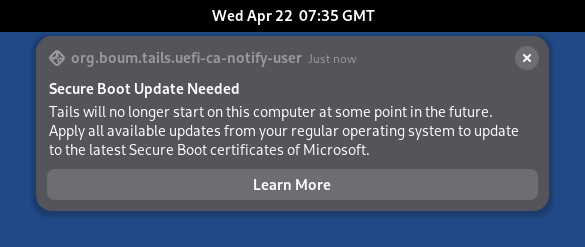
Caso contrário, o Tails não será mais iniciado neste computador após uma futura atualização. Não podemos prever quando essa atualização ocorrerá, pois o momento depende de alterações que o Tails poderá herdar do Debian em qualquer atualização.
Após essa alteração no Tails, o computador pode exibir um erro de Violação de Inicialização Segura ou outra mensagem de erro ao tentar iniciar o Tails.
Por que isso está acontecendo?
Secure Boot is a security measure that prevents starting malicious operating systems on a computer. Most computers running Windows have Secure Boot enabled. Linux distributions, including Tails, also support Secure Boot.
Since 2023, Microsoft has started replacing the Secure Boot certificates originally issued in 2011. These older certificates begin expiring in June 2026.
O Tails detectou que o computador ainda possui certificados de Inicialização Segura desatualizados e precisa ser atualizado.
Atualizando os certificados de Inicialização Segura
Para atualizar os certificados de Inicialização Segura do computador, reinicie o sistema operacional, Windows ou Linux, e aplique todas as atualizações disponíveis.
For Windows, select Start ▸ Settings ▸ Windows Update ▸ Check for Windows updates.
See also Microsoft: Install Windows updates.
For Linux, such updates are applied by the fwupd daemon.
Linux distributions that use the GNOME desktop automatically apply this update through GNOME Software.
Disabling Secure Boot
If the Secure Boot Update Needed notification persists when restarting Tails, it means that the Secure Boot certificates of the computer are still outdated.
Instead of updating the certificate, you can also disable Secure Boot. Even with Secure Boot disabled, the regular operating system should still start.
You can usually disable Secure Boot through the BIOS settings of the computer, but the procedure varies by manufacturer. To learn how to edit the BIOS settings, search for the user manual of the computer on the support website of the manufacturer.
In the BIOS menu, find the Secure Boot setting and disable it. This option is usually in either the Security tab, the Boot tab, or the Authentication tab.