Die folgenden Abschnitte fassen die häufigsten Probleme bei der Verbindung zu Tor zusammen.
Die Computeruhr ist auf eine falsche Zeitzone eingestellt
Die Uhr des Computers muss richtig eingestellt sein, um sich mit Tor zu verbinden.
Wenn Sie sich dafür entscheiden, zu verbergen, dass Sie eine Verbindung zu Tor herstellen, müssen Sie die Uhr möglicherweise manuell korrigieren, wenn Tails keine Verbindung zu Tor herstellen kann.
Wählen Sie Uhr reparieren im Fehlerbildschirm des Assistenten Tor Connection, um die Uhr und die Zeitzone Ihres Computers einzustellen.
If you have problems fixing the clock, you can instead try to restart Tails and choose to connect to Tor automatically. When connecting to Tor automatically, Tails fixes the clock automatically by connecting to the captive portal detection service of Fedora before connecting to Tor.
Sie müssen sich im Netzwerk anmelden
Ein firmeneigenes Portal ist eine Webseite, die oft angezeigt wird, bevor Sie auf das Internet in öffentlichen Netzwerken in Flughäfen, Hotels, Bibliotheken und anderen Orten zugreifen können.
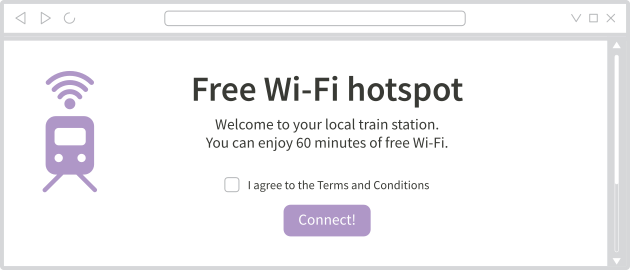
Tails kann sich nicht mit dem Tor-Netzwerk verbinden, wenn die Internetverbindung zunächst durch ein Captive Portal blockiert ist.
So melden Sie sich über ein Captive-Portal bei einem Netzwerk an:
Wählen Sie im Fehlermeldungsbildschirm des Tor Connection-Assistenten Versuchen, sich im Netzwerk anzumelden.
Warten Sie, bis der Unsichere Browser startet.
Follow the instructions on the home page of the Unsafe Browser.
You need to configure a Tor bridge
Sie können momentan obfs4- und WebTunnel-Brücken (bridges) in Tails benutzen.
Um eine Tor-Brücke in Tor-Verbindung einzurichten, können Sie entweder:
Basierend auf Ihrer Region eine Brücke anfragen
Diese Option ist am einfachsten, denn sie erlaubt es Ihnen, direkt von Tails mehr über Brücken zu lernen.
Die Informationen über die Brücken, welche in Ihrer Region am wahrscheinlichsten funktionieren, lädt Tails von der Moat API des Tor Projects herunter. Um Zensur zu umgehen, wird diese Verbindung mittels domain fronting als Verbindung zu einer anderen Website getarnt.
Wenn sie als Region Automatisch auswählen, wird das Land Ihrer IP-Adresse verwendet.
Ask for a bridge by email
You can send an empty email to bridges@torproject.org from a Gmail or Riseup email address.
Sending the email reveals to Gmail or Riseup that you are trying to connect to Tor but not to someone who monitors your Internet connection.
Enter a bridge that you already know
Before starting Tails, learn about bridges by either:
Visiting https://bridges.torproject.org/options.
We recommend that you visit this page from a different local network if accessing this page is blocked or if you want to hide that you are connecting to Tor.
Sending a message to @GetBridgesBot from Telegram.
Store the bridge lines in a text document on separate USB stick for later use in Tails.
After you started Tails, copy one of the bridge lines from this other USB stick into Tor Connection.
Even someone who knows your bridge cannot know what you are doing online from Tails.
Der Fortschrittsbalken bleibt bei etwa 50% stehen
When using a custom Tor obfs4 bridge, the progress bar of Tor Connection sometimes gets stuck halfway through and becomes extremely slow.

Um dies zu beheben, können Sie entweder:
Schließen Sie Tor Connection und öffnen Sie es erneut, um die initiale Verbindung zu beschleunigen.
Versuchen Sie es mit einer anderen Brücke.
Dieses Problem betrifft nur veraltete obfs4-Brücken und tritt nicht bei obfs4-Brücken auf, die Version 0.0.12 oder höher verwenden.
Die Brücke ist nicht mehr funktionsfähig
Es ist möglich, dass die Brücke, die Sie eingegeben haben, nicht mehr funktioniert.
Versuchen Sie es mit einer anderen Brücke.
Sie haben die Brücke nicht korrekt eingegeben
You can use obfs4 and WebTunnel bridges in Tails right now.
Eine obfs4-Brücke sieht aus wie:
obfs4 1.2.3.4:1234 B0E566C9031657EA7ED3FC9D248E8AC4F37635A4 cert=OYWq67L7MDApdJCctUAF7rX8LHvMxvIBPHOoAp0+YXzlQdsxhw6EapaMNwbbGICkpY8CPQ iat-mode=0A WebTunnel bridge looks like:
webtunnel [1234:567:890a:bcde:f123:4567:890a:bcde]:443 5F55B60FF2AEA996B5109BC338FC5F2BCA696F52 url=https://example.com/webtunnel ver=0.0.1
Sie müssen die gesamte Zeile eingeben, nicht nur die Kombination aus IP-Adresse und Port.