Всё, что вы делаете онлайн в Tails, проходит через сеть Tor.
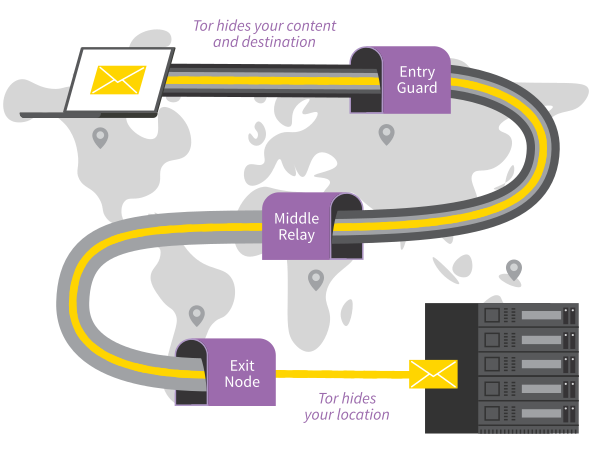
Tor шифрует и анонимизирует ваш трафик, пропуская его через три узла. Это серверы, которые поддерживают разные люди и организации по всему миру.
You cannot access the Internet from Tails until you are connected to
Tor. For example, Tor Browser displays the error message The proxy server
is refusing connections until you are connected to Tor.
Because Tor routes your Internet traffic through 3 relays before reaching its destination, the connection is slower than when you are not using Tor.
See our documentation on why Tor is slow.
Как подключиться к сети Tor.
Подключитесь к сети по проводу, wi-fi или мобильной связи.
Появится мастер подключения Tor. Он поможет подключиться к сети Tor.

Выберите один из вариантов:
подключиться к Tor автоматически;
скрыть от вашей локальной сети факт подключения к Tor.
Далее мы рассказываем об особенностях каждого метода.
Tor relays and bridges
Public Tor relays
Скорее всего, ваша локальная сеть не блокирует доступ к сети Tor. Тогда вы можете использовать в качестве первого узла Tor открытый узел.
Когда для подключения к сети Tor вы используете публичный узел Tor, ваша локальная сеть «знает», что вы соединяетесь с Tor (хотя все ваши действия онлайн по-прежнему анонимны).
Tor bridges
Tor bridges are secret Tor relays that hide that you are connecting to Tor.
Если подключение к Tor заблокировано или может вызвать нездоровый интерес у кого-то, кто способен мониторить ваши сетевые подключения, попробуйте использовать мост в качестве первого узла в цепочке Tor.
Мосты Tor созданы для обхода блокировки Tor: например, в странах, где подключения к сети Tor блокируются, в некоторых публичных сетях и системах родительского контроля.
Ваше подключение имеет такой вид, что никто не заподозрит связь с Tor.
Мосты Tor часто оказываются менее надёжными и быстрыми, чем публичные узлы Tor.
Connecting to Tor automatically
Советуем подключаться к Tor автоматически, если вы находитесь в публичной сети wi-fi или если множество людей в вашей стране использует Tor для обхода цензуры.
When you choose this option:
First, Tails synchronizes the clock of the computer automatically, because a correct time is needed to be able to connect to the Tor network.
Tails learns the current time by connecting to the captive portal detection service of Fedora, which is used by most Linux distributions. This connection does not go through the Tor network and is an exception to our policy of only making Internet connections through the Tor network.
You can learn more about our security assessment of this time synchronization in our design documentation about non-Tor traffic.
If you choose instead to hide that you are connecting to Tor, you might have to fix the computer clock manually.
If Tails fails to synchronize the clock because you have to sign in to the network using a captive portal, an error screen is displayed that helps you do so.
For detailed instructions, see how to sign in to the network using a captive portal.
Then, Tails tries different ways of connecting to Tor until it succeeds:
Tails tries to connect to Tor directly using public relays, without using a bridge.
Tails tries to connect to Tor using one of the default bridges, already included in Tails, if connecting using public relays fails.
Tails uses the default obfs4 bridges from Tor Browser.
If public relays and default bridges don't work, Tails asks you to configure a custom bridge.
See configuring a Tor bridge below.
Если кто-то мониторит ваше подключение к Интернету, он может определить, что эти попытки исходят от пользователя Tails.
Hiding to your local network that you are connecting to Tor
Что, если злоумышленник мониторит ваше подключение к Интернету, а вам нужно подключиться к Tor незаметно и не вызывая подозрений?
When you choose this option, Tails will only connect to Tor after you configure a custom Tor bridge. Bridges are secret Tor relays that hide that you are connecting to Tor.
Нельзя скрыть от посещаемых вами сайтов то, что вы используете Tor, потому что список выходных узлов Tor открыт.
Наша команда разработчиков делает всё возможное, чтобы обеспечить вас самыми малозаметными мостами. Что же будет, если вы выберете этот вариант подключения к Tor?
Tails does not automatically detect whether you have to sign in to the network using a captive portal.
Default bridges are not available.
Configuring a Tor bridge
When Tor Connection fails to connect to Tor using public relays and default bridges, select Configure a Tor Bridge from the error screen.
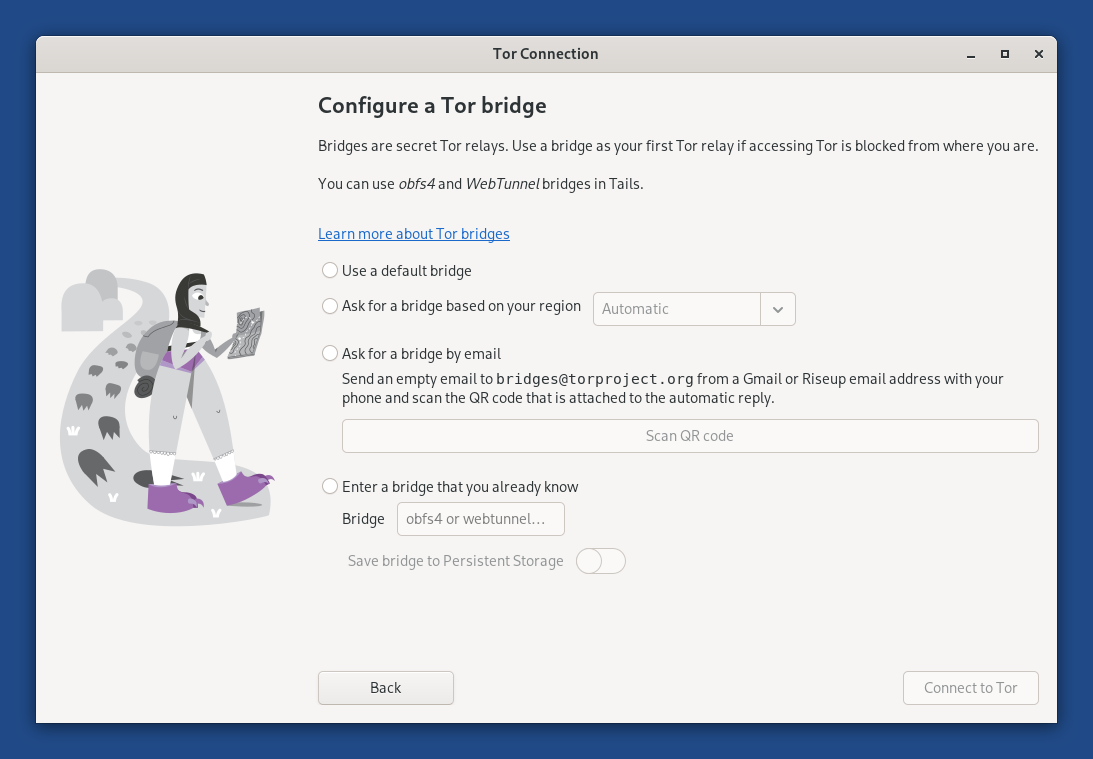
You can use obfs4 and WebTunnel bridges in Tails right now.
To configure a Tor bridge in Tor Connection, you can either:
Ask for a bridge based on your region
This option is the easiest as it allows you to learn about bridges directly from Tails.
Tails downloads information about bridges that are most likely to work in your region from the Moat API of the Tor Project. To circumvent censorship, this connection is disguised as a connection to another website using domain fronting.
If you choose Automatic as region, the country of your IP address is used.
Ask for a bridge by email
You can send an empty email to bridges@torproject.org from a Gmail or Riseup email address.
Sending the email reveals to Gmail or Riseup that you are trying to connect to Tor but not to someone who monitors your Internet connection.
Enter a bridge that you already know
Before starting Tails, learn about bridges by either:
Visiting https://bridges.torproject.org/options.
We recommend that you visit this page from a different local network if accessing this page is blocked or if you want to hide that you are connecting to Tor.
Sending a message to @GetBridgesBot from Telegram.
Store the bridge lines in a text document on separate USB stick for later use in Tails.
After you started Tails, copy one of the bridge lines from this other USB stick into Tor Connection.
Even someone who knows your bridge cannot know what you are doing online from Tails.
To save the last Tor bridge that connected to Tor successfully, turn on the Tor Bridge feature of the Persistent Storage.
Troubleshooting connecting to Tor
See our documentation on troubleshooting connecting to Tor.
Viewing the status of Tor
Статус Tor виден как значок луковицы в области уведомлений:
 You are connected to Tor.
 You are not connected to Tor.
To view the list of Tor circuits that are used by your different applications, click on the Tor status icon and choose View Tor Circuits. Learn more about managing Tor circuits.